

Tracking
Google Analytics on your published site, with the visitor's consent.
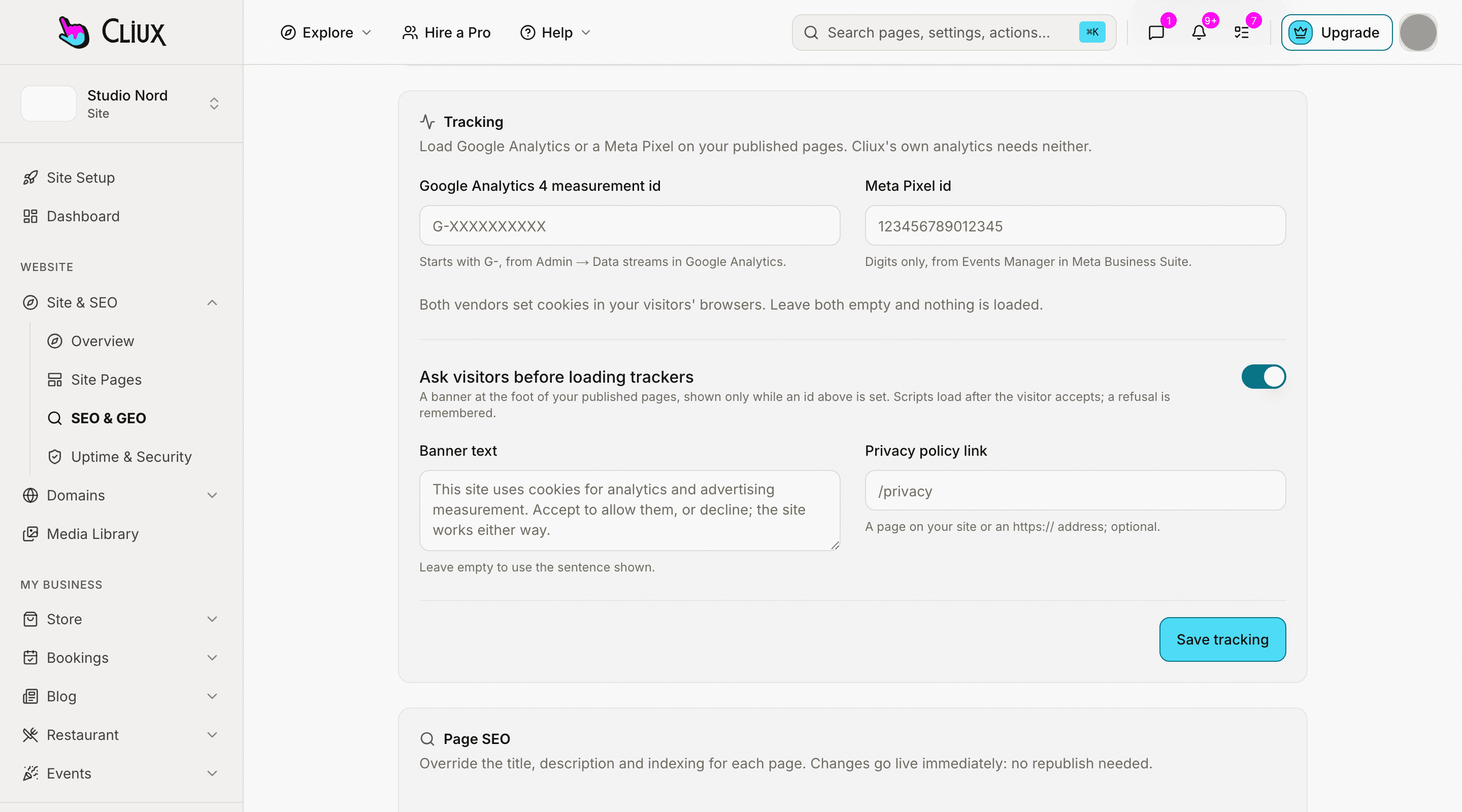
Paste your GA4 measurement id under SEO & GEO. Your published pages load Google's script after the visitor accepts the cookie banner, and Cliux's own analytics keeps counting either way.
How you connect
Where Google Analytics is switched on
The screen, the path to it in the sidebar, and what happens when you press the button. Nothing else to install.
Site console
- Site & SEO
- SEO & GEO
Press Save tracking. The Tracking card takes the measurement id (it starts with G-) and refuses anything of another shape. The next visit to the published site carries it.
Consent first
The banner does the asking, and the script waits for the answer.
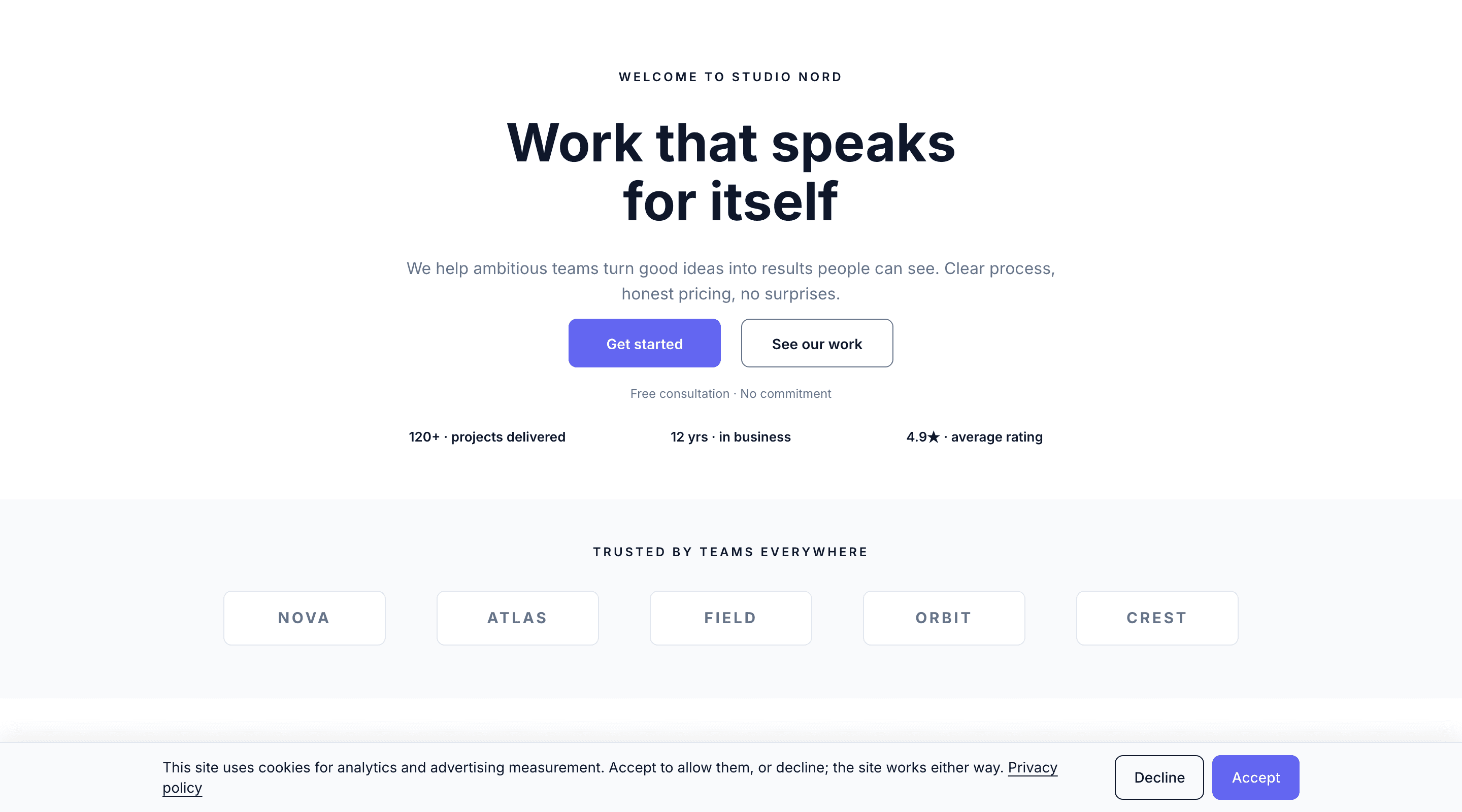
Google Analytics sets cookies, so as soon as an id is set your published pages show a consent banner at the foot. Accept loads the script on that page; Decline is remembered and nothing loads, on that page or the next. Your first-party analytics, which sets no cookie, is not behind the banner.
Shown only while an id is set
Clear the field and the banner goes with the script.
An answer is kept
The visitor's choice lives in their browser on your own domain and is asked again after it expires.
Your words, your policy link
Write the sentence and point at your privacy page, or keep the built-in one.
- Days a visitor's answer is kept
- 180
Counted in the product, not estimated.
What you get
Google Analytics with Cliux
One field, a GA4 id
A measurement id of the form G-XXXXXXXXXX. Universal Analytics ids are refused; GA4 is what Google runs.
Loads after consent
gtag.js is added to the page in the browser once the visitor accepts, and not before. Nothing about it is in the page until then.
Every published page
The home page, every site page, blog posts and the member pages carry the same id; there is nothing to place per page.
Your Google account, your data
The page views arrive in the Google Analytics property you own. Cliux does not read them and has no key to it.
Alongside first-party analytics
Cliux's own traffic, sources and realtime view keep working with or without Google, and without the banner.
Undo is clearing the field
Remove the id and save: the script and the banner are gone on the next visit.
Not included
Said plainly, so you can decide
What this connection does not do today. If one of these is the thing you need, tell us through the contact form; the list is prioritised from those requests.
- Event mapping
- Form submissions, purchases and clicks are not sent to Google as events. Google receives page views from its own script.
- Ecommerce measurement
- Store orders are not reported to Google Analytics as transactions.
- Google Tag Manager
- There is no container field. The measurement id loads gtag.js directly.
- Server-side tagging
- The script runs in the visitor's browser; nothing is relayed through Cliux's servers.
- Consent Mode signals
- Cliux does not send Google's consent-mode flags. It withholds the script until the visitor accepts, which is the stricter of the two.
Frequently asked questions
Have other questions?Use the contact form
In the site console under Site & SEO → SEO & GEO, in the Tracking card. Save, and the next visit to the published site carries it.
Yes, while an id is set and the banner switch is on, which it is by default. Google Analytics sets cookies, so the site asks first. You can turn the banner off in the same card; then getting consent is your responsibility.
No. It keeps its visitor id in the browser's storage, sets no cookie, and posts to your own site, so it runs with or without an answer. The analytics feature page says the same.
Not today. Google receives the page views its own script records. Cliux's first-party analytics records clicks, form submissions and custom events on your own dashboard.
No. The field takes a GA4 measurement id and loads Google's script directly. There is no container field.
Get started
Try Google Analytics on a Cliux site.
Building and previewing costs nothing. Publishing with your own domain is $9 a month on a personal site, and the agency Starter plan publishes 2 client sites for free.