

Site analytics
Your visitors, counted by your own site.
A first-party script that sets no cookies, sessions and sources in your dashboard, and a realtime view. Nothing to install, nothing to consent to for a visitor who never leaves your domain.
First party
No cookies. No banner for the analytics.
The tracking snippet is served with your site and posts to your site. The visitor id lives in the browser's own storage, not in a cookie, so analytics alone does not put a consent banner on your page.
Four events, plus yours
Page views with load time, clicks on links and buttons, form submits, and custom events from one line of script.
Sessions, thirty minutes
A visit ends after thirty quiet minutes; duration, bounce, landing and exit page are recorded.
Device, browser, OS
Read from the request, kept per session, shown as a breakdown.
Traffic
Where they came from, and what they read.
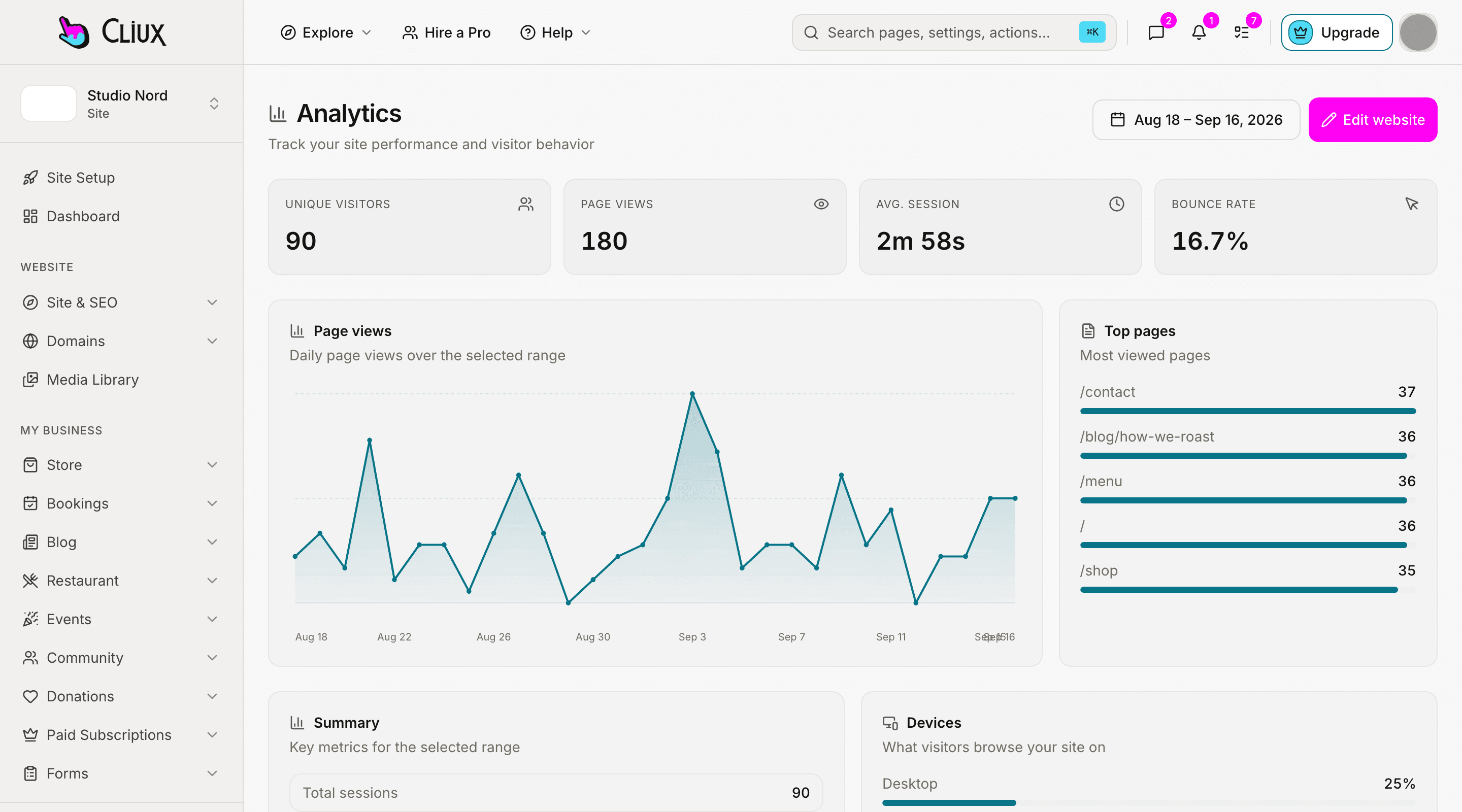
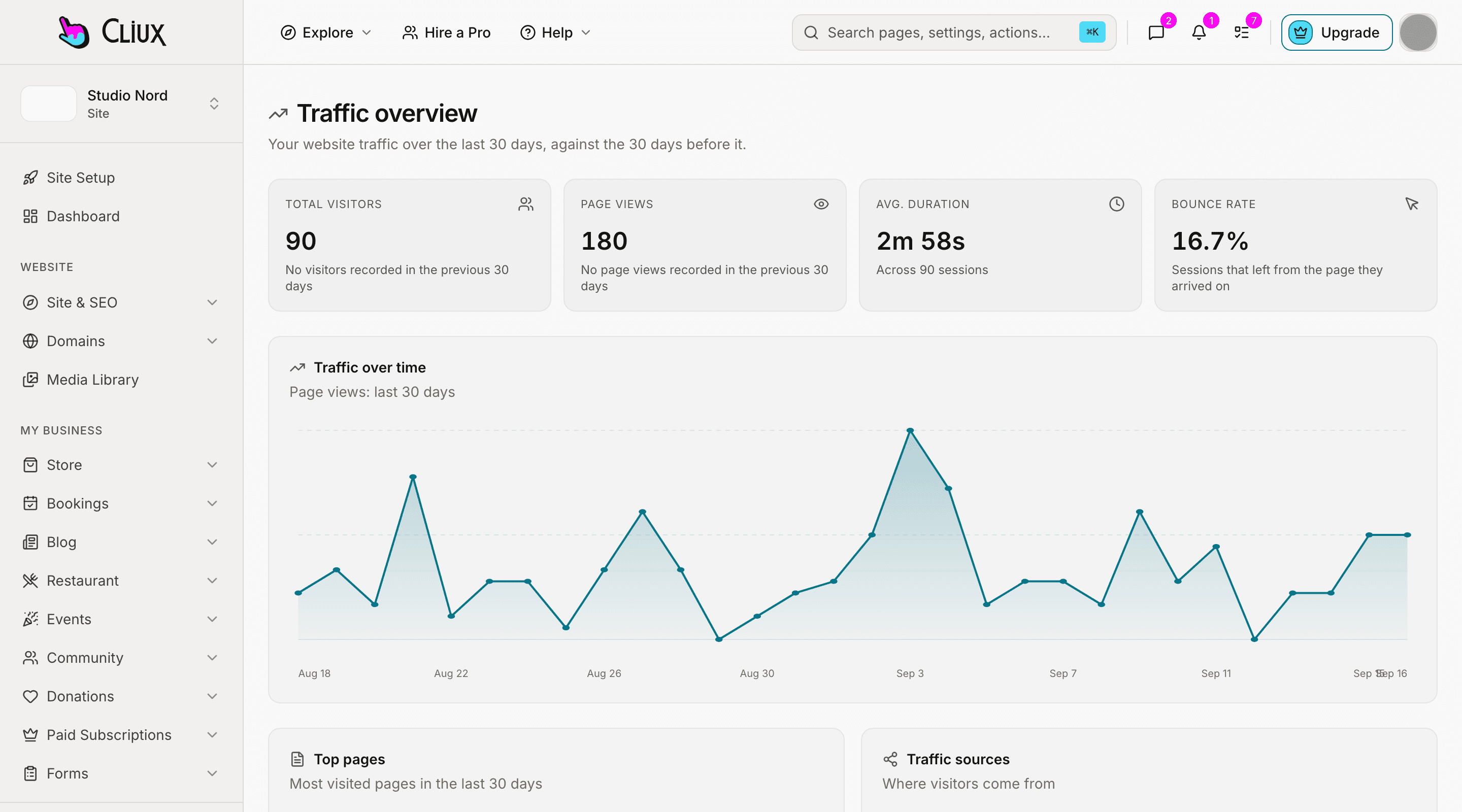
The traffic view compares the last thirty days with the thirty before, lists your top pages, and groups visits by source: the five UTM parameters on the link, or the referrer when there are none.
UTM and referrer
Source, medium, campaign, term and content from the URL; the referring site otherwise.
Top pages
The pages that were opened most, over the period you are looking at.
Realtime
Who is on the site right now, and on which page.
- Built-in event types, plus custom
- 4
- UTM parameters read
- 5
- Session timeout
- 30 min
Counted in the product, not estimated.
Capabilities
What you get
Every capability below is on every plan; building is free and publishing is the plan.
The overview
Unique visitors, page views, average session, bounce rate, a daily chart, top pages and devices.
Traffic over time
Page views by day, against the same period before.
Sources
UTM-tagged campaigns and referrers, so a link you shared can be told apart from search.
Realtime view
Active visitors and their pages, refreshed as they move.
Per-core analytics
Bookings, the community and the blog each have their own numbers page beside their data.
Uptime checks
Published sites are pinged on a schedule and the result is kept per site.
Frequently asked questions
Have other questions?Use the contact form
Not for this. The script keeps its visitor and session ids in the browser's local and session storage and sets no cookie. If you add other tools that set cookies, that is a separate decision.
The script runs in the browser and posts to your own site, which most blockers leave alone; a blocker that stops all scripts stops this one too. There is no server-side tracking that bypasses a visitor's choice.
Yes. Call the tracking function with a name and a payload from any script on the page, and the event shows up with the built-in ones.
No. Analytics here is counts and sessions: pages, sources, devices, durations. There is no recording of what a visitor did on the screen.
Yes. The realtime view lists active visitors and the page each one is on.
No. What exists is the landing and exit page of every session, the top pages, and clicks and form submissions arriving in the realtime feed. A step-by-step funnel report is not built.
Then the rule changes, and the site changes with it: both vendors set cookies, so as soon as you enter an id under SEO & GEO your published pages show a consent banner and load that script only after the visitor accepts. The first-party analytics keeps running either way.
Get started
Try Analytics for free.
Building and previewing costs nothing. Publishing with your own domain is $9 a month on a personal site, and the agency Starter plan publishes 2 client sites for free.